graph TD
    subgraph Software
        RTMC[RTMC]
        DF[Dragonframe]
        UE[Unreal Engine]
    end

    subgraph PCs
        OldPC[DOS Laptop]
        ModernPC[Modern PC]
    end

    subgraph "Interfaces"
        Kuper[Kuper]
        subgraph "Arduino"
            DMCLite[DMCLite]
            DMC[dmc]
        end


    end

    subgraph "Motor Controllers"
        Coppola[Coppola]
    end

    subgraph Robots
        Big[Big Robot]
        Little[Little Robot]
    end

    RTMC --> OldPC
    OldPC --- Kuper

    DF --> ModernPC
    UE --> ModernPC

    ModernPC -- USB --- DMCLite
    ModernPC -- USB --- DMC

    Kuper --> Coppola
    Coppola --> Big
    Coppola --> Little

    DMCLite --> Coppola
    DMC --> Coppola
How to Launch Kuper RTMC
- (opt) Turn on driver pack power
- Turn on laptop power
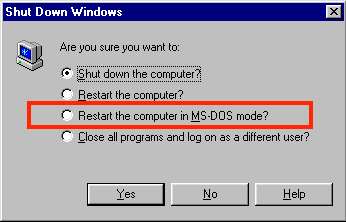
- Wait for laptop to boot into Windows 95
- Select “Shut down Windows 95”
- CRUCIAL -> When prompted, select “Restart in MS-DOS mode”
- Change directory to
cd C:\KUPER48 - Launch
RTMC130 - To quit, select
QUITfromRTMC - Power off laptop
- (opt) Turn off driver pack power
Control Stack
The control stack consists of multiple software paths and interfaces depending on the required motion control (MoCo) or stop-motion (Stopmo) capabilities.